
How to Fish - Known Bugs, Crashes & Community Fixes
20 August 2026
About this game
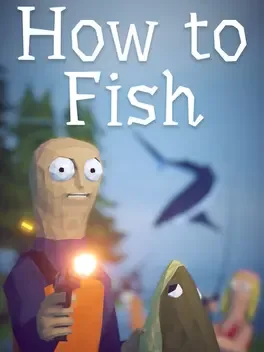
How to Fish is a 1 to 4 player physics based fishing simulator where a day of drinking and boating ends with your crew stranded on a small island, forcing you to master fishing to get home. You start with no gear or weapons, catch and kill fish, then sell your haul to earn money for improved equipment and weapon upgrades. As you complete quests and defeat bosses, you unlock new islands that feature tougher creatures and more powerful gear. Along the way you can hunt for rare variants of every fish type, pull off trick shots to boost your earnings, and even gamble to try to multiply your cash.
Developed by · Published by
Verify the integrity of How to Fish’s game files in Steam’s properties under Installed Files.

Related guideHow to Verify Game File Integrity (Steam, Epic, GOG, Xbox)
Update your NVIDIA, AMD or Intel graphics drivers to the latest stable release and restart your PC before testing the game again.

Related guideHow to Update Your GPU Drivers for Gaming
Run the game executable as administrator and disable fullscreen optimizations in its compatibility properties before starting the game.
Related guideHow to Run a Game as Administrator on Windows
Clear Steam’s download cache from the Steam settings menu and then restart Steam before relaunching the game.
Cap the game’s frame rate using your GPU control panel or in-game settings to reduce crashes and stuttering.
Close unnecessary background programs and overlays like Steam, Discord, or GPU overlays before launching How to Fish to reduce crashes and stuttering.

Related guideHow to Disable Overlays That Cause Crashes (Steam, Discord, NVIDIA, AMD, Xbox Game Bar)
Restart both the game and Steam completely before joining a friend’s lobby again, using either lobby ID or Steam join options.
Avoid quitting immediately after saving and reloading; wait for a short period to let autosaves complete before exiting to reduce the chance of losing inventory items.
Temporarily disable any VPN or proxy software and test the game’s online features without them.
Allow How to Fish and Steam through Windows Defender Firewall by adding them to the list of permitted apps.

Related guideHow to Add a Game to Antivirus Exclusions on Windows
Use a wired Ethernet connection or a stable 5 GHz Wi‑Fi network instead of congested 2.4 GHz Wi‑Fi when playing multiplayer.
Try having a different friend host the multiplayer lobby to work around host-specific connection issues.
Avoid placing more than one fish at a time on the volcano grill; cook a single fish, finish interacting with it, and then restart the session if the grill stops accepting additional fish.
Check the control settings to adjust or disable any look‑input lock options so you can cast your rod or aim while moving the camera.
Activate the leech quest, then slowly sweep the second island’s ground level around vegetation and structures to find all five leeches before returning to the quest giver.
Try running the game in a different Windows compatibility mode and re-verify the game files in Steam to address the Unity error 6000.4.4f1_360f97ecca93.
Related guideHow to Verify Game File Integrity (Steam, Epic, GOG, Xbox)
Advertisement
System requirements
Minimum
- OS: Windows 10+
- Processor: Intel Core i5-5257U, AMD Ryzen 3 1200 or equivalent
- Memory: 8 GB RAM
- Graphics: GeForce GTX 1050, AMD RX 460 or equivalent
- Storage: 1 GB available space
Recommended
- Requires a 64-bit processor and operating system