Fix your game • Help others • Play more

Bugfree

The Blood of Dawnwalker - Known Bugs, Crashes & Community Fixes
3 September 2026
The Blood of Dawnwalker

About this game

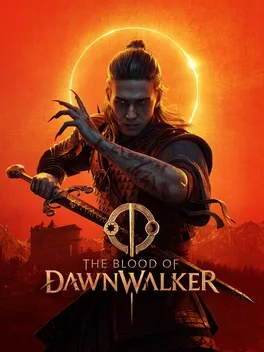
The Blood of Dawnwalker is a single-player, third-person open-world dark fantasy action RPG set in AD 1347 in a fictional Carpathian kingdom ravaged by bloody conflicts and the Black Death. You play as Coen, a young man turned Dawnwalker, human by day and vampire by night, torn between preserving his humanity and wielding cursed powers to save his family. Your choices shape a branching, narrative-focused saga: pursue rescue or revenge, uncover ancient secrets in Vale Sangora, forge or reject alliances, and decide whom to help as time relentlessly advances and your family’s days run out. Distinct day and night gameplay loops let you defy gravity and unleash supernatural force as a vampire or fight with steel and potent magic as a human, each form offering unique strengths, abilities, and approaches to quests. Built in Unreal Engine 5, the hand-crafted world spans forests, plains, swamps, mountains, medieval settlements, and forgotten ruins, inviting exploration in a high-stakes role-playing experience.

Developed by · Published by

Bugs, Crashes & Solutions

Launch the game in Full Screen mode instead of Windowed or Borderless mode to reduce mode-specific stuttering.
Enable DLSS, FSR, or XeSS in Quality or Balanced mode, then lower shadows, volumetric effects, reflections, foliage, and global illumination.
Install the game on an SSD and allow the initial shader-compilation process to finish before judging traversal stutter.
Close unnecessary background applications and disable overlays that could conflict with the game.
How to Disable Overlays That Cause Crashes (Steam, Discord, NVIDIA, AMD, Xbox Game Bar)
Related guideHow to Disable Overlays That Cause Crashes (Steam, Discord, NVIDIA, AMD, Xbox Game Bar)
Update your GPU drivers to the latest available release to improve DirectX compatibility and prevent driver related errors.
How to Update Your GPU Drivers for Gaming
Related guideHow to Update Your GPU Drivers for Gaming
Verify the game files through your launcher to repair missing or corrupted files that could prevent the game from starting.
How to Verify Game File Integrity (Steam, Epic, GOG, Xbox)
Related guideHow to Verify Game File Integrity (Steam, Epic, GOG, Xbox)
Install the latest Windows updates to ensure your system has the newest DirectX components and compatibility fixes.
Set the game to use your dedicated GPU instead of integrated graphics.
How to Force a Game to Use Your Dedicated GPU on Windows
Related guideHow to Force a Game to Use Your Dedicated GPU on Windows
Temporarily disable your antivirus or add the game folder to its exclusions to prevent security software from interfering with required files.
How to Add a Game to Antivirus Exclusions on Windows
Related guideHow to Add a Game to Antivirus Exclusions on Windows
Trigger the pending infamy cutscene by attacking a lone guard at night in vampire mode, or bite an NPC to clear the progression state and restore saving.
  • Open the Steam controller layout for the game.
  • Set the left joystick deadzone source to Custom and change the deadzone shape from Circle to Square.
  • If necessary, lower the left deadzone limit to approximately 90 and save the layout.
Reduce the controller sensitivity from 1.0 to 0.8 in the console settings as a temporary workaround for sprinting stopping during direction changes.
Disable frame generation and enable a frame-rate limit below your display's refresh rate to reduce flickering.
Try disabling V-Sync, depth of field, and bloom in the display settings if screen flickering persists.
Use 720p resolution with balanced XeSS and cap the game at 30 FPS; this may reduce handheld performance fluctuations but does not guarantee a stable frame rate.

Advertisement

Known issues (no solution listed yet)

These are community-reported issues we don’t have a listed fix for yet. If something worked for you, share it.

  • Lacra's character model disappears during the Brencis pursuit quest

    Last reported: September 7, 2026

  • Menus become unresponsive after switching to fullscreen

    Last reported: September 5, 2026

  • Enemy lock-on intermittently fails during gameplay

    Last reported: September 5, 2026

  • FSR frame generation crashes on ultrawide displays

    Last reported: September 5, 2026

System requirements

Minimum

  • OS: Windows 10, DirectX12
  • Processor: Intel Core i5-11400F / AMD Ryzen 7 2700X
  • Memory: 16 GB RAM
  • Graphics: NVIDIA GTX 1060 / Radeon RX 580
  • DirectX: Version 12
  • Storage: 60 GB available space

Recommended

  • OS: Windows 10, DirectX12
  • Processor: Intel Core i7-11700K / AMD Ryzen 7 5700X
  • Memory: 16 GB RAM
  • Graphics: NVIDIA RTX 4060 / Radeon RX 7600 XT / Intel Arc B580
  • DirectX: Version 12
  • Storage: 60 GB available space